Showing posts with label Smartway7 Original. Show all posts

Monday, July 2, 2012

BitDefender Total Security 2013 free for 90 days


Bitdefender Total Security blah blah blah.......................
                         I know we all don't like this long descriptions about a software! We are experts in this (indeed). So here is the useful part. To get 3 months free security just like this page and download the application (if you like so). 


Saturday, January 15, 2011

HTC widget for Windows!


Features:
Weather forecast widget on the desktop
HTC Home 2 is first of all a widget with a clock, weather forecast and realistic animation. You can watch clouds floating across your desktop, rain drops slide down your screen and even lightning striking here and there. The quality and accuracy of weather forecast are guaranteed by The Weather Channel and MSN and others.
HTC Home 2 is analogous to the weather widget for HTC communicators. The program can be installed to your PC with Windows Vista or Windows 7 operation system (other operation systems are not supported, although it might work with Windows XP).
Quick access
HTC Home 2 uses Windows 7 taskbar facilities to display actual weather at the taskbar without opening the program window. To find out what the weather outside is you just need to look at your taskbar!
Your widget shows rain, but you don’t see any? No worry, it may start raining any moment!
Skins support
You can adjust HTC Home 2 to your taste with the help of different skins. Bright or tranquil, informative or plain – you can choose the one that suits you.


Additional widgets
HTC Home 2 does not mean only weather forecast. It also implies a calendar, bookmarks, music player. We have worked out a nice platform for widgets. Additional widgets however may function unstably and cause errors.
Widgets available are:
Master wizard
HTC Home 2 setting is simple and convenient due to the Wizard that allows adjusting the weather forecast widget during the first loading.
Other features
Weather tunes:You can know about the weather outside by the sounds produced by HTC Home 2
Support of localizations:We have done everything possible to make HTC Home 2 available in terms of your mother tongue.
Support of proxy server:HTC Home 2 can work in corporate networks that have access to the Internet through a proxy server.

System requirements

  • PC with Windows Vista or Windows 7 (32 or 64-bit operation systems). The program also may function with other Windows operation systems, but we cannot guarantee that.
  • Internet connection (also possible through proxy-server)
  • Installed Microsoft.NET Framework 4
My review:
It is looking awesome on desktop but where is the installation path! I can't find it on the program files folder or it's shortcut on desktop. The application path is "C:\Users\*****\AppData\Roaming\HTC Home\HTCHome.exe". You cannot uninstall as it is a standalone application to my knowledge! so just remove the application directory. You can also pin the widget on desktop so it will stick on the specified place on desktop. It can also be used alongside the Windows sidebar.


Pros:Open source, Good graphics, re-sizable widget, various skins and low memory usage
Cons:Only few widgets and the program may crash on some occasions!

Ratings: 3.5/5

Download the software here
Download portable version here
Download Microsoft .NET framework 4.0 here

Website: HTC Home

Image representing HTC as depicted in CrunchBaseImage via CrunchBase


Enhanced by Zemanta

Friday, January 14, 2011

Free Animated Desktop Wallpaper and Widget


Tired of static Windows desktop? Artdock animated desktop wallpaper will change everything! Low memory and CPU use!

Video on website


FishAnimated Wallpaper recorded on my Dsktop


Credits:
  • Free of Adware or Spyware or Virus (Tested by Ad-Aware Pro)
  • Low on memory usage(around 5 MB only)
  • Excellent graphics
  • Attractive backgrounds
  • FREE of cost
The website also hosts Free website and blogger templates, Free icons.
So hurry make a visit to http://artdocks.com and download animated wallpapers and templates

Thursday, January 13, 2011

Paperfile Scanning OCR Software

Scanning Software - OCR Software

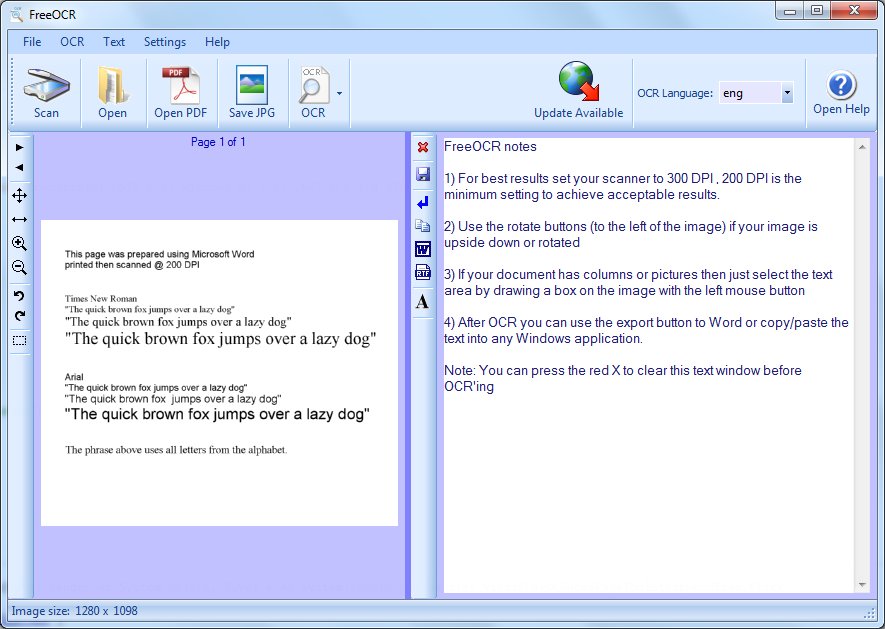
FreeOCR supports scanning from most Twain scanners and can also open most scanned PDF's and multipage Tiff images as well as popular image file formats.

About FreeOCR

Free OCR is an OCR scanning software including the Windows compiled Tesseract free ocr engine also known as a Tesseract GUI. It includes a Windows installer and It is very simple to use and supports opening multi-page tiff's, Adobe PDF and fax documents as well as most image types including compressed Tiff's which the Tesseract engine on its own cannot read .It now can scan using Twain and WIA scanning drivers.

The Tesseract OCR PDF engine is an open source product released by Google. It was developed at Hewlett Packard Laboratories between 1985 and 1995. In 1995 it was one of the top 3 performers at the OCR accuracy contest organized by University of Nevada in Las Vegas. The Tesseract engine source code is now maintained by Google and the project can be found here: http://code.google.com/p/tesseract-ocr/

FreeOCR is freeware and you can do what you like with it including commercial use. The included Tesseract free OCR engine is distributed under the Apache V2.0 license.

FreeOCR V4 is soon to be released this includes Tesseract V3 which increases accuracy and has page layout anaysis so more accurate results can be achieved without using the zone selection tool.

FreeOCR v4 is currently undergoing beta tesing and will be released in the first half of 2011

Download FreeOCR

Operating System

Recommended Minimum Specification

Windows 2000
Windows 2003
Windows XP 32 bit
Windows Vista (all editions)
Windiws 7 (all)

Pentium Processor - 200MHz
256 MB Memory (RAM)
10MB Free Disk Space
SVGA Resolution Display
.Net Framework 2.0 or higher


To enable scanning of images you will need a desktop scanner that uses Twain or WIA compatible scanning drivers. FreeOCR requires the .Net Framework V2.0 from Microsoft. If you do not have this installed then the FreeOCR installer will automatically scan detect & download this for you.

Download here

Other Free Document Softwares here
Why is a Computer Virus is Called a "Virus"

All of you might know about computer virus. Have you ever thought why is it called a VIRUS.

Let me explain.

First of all let me make you clear about the Computer virus. A computer Virus is a kind of malware, and a small program which will infect through an INFECTED file or a program mainly via internet or Flash drives(most frequently through this means these days) to a healthy or already infected System. The infected system is may be a Desktop or a server mainly running a Windows OS.


Wikipedia definition for a Computer Virus
"A computer virus is a computer program that can copy itself and infect a computer. The term "virus" is also commonly but erroneously used to refer to other types of malware, including but not limited to adware and spyware programs that do not have the reproductive ability. A true virus can spread from one computer to another (in some form of executable code) when its host is taken to the target computer; for instance because a user sent it over a network or the Internet, or carried it on a removable medium such as a floppy disk, CD, DVD, or USB drive."

From above definition you came to know that a Computer Virus needs a host program to spread. It can't be active without a host program. But it can copy itself to the entire system which other malware programs like ADWARE and SPYWARE can't do.


Now about a Virus. It is Organic compound consisting of Nuclei acids embedded in the core of Lipo-polysaccharide shell. The Virus is inactive outside a host cell or living cell. It is harmless outside the living cell. But when it infects a cell, it takes control over the functions of that infected cell and makes it to work for the virus! It uses the genetic material of host cell to multiply and finally may kill the host. You are also aware of the fact that the Virus can spread from any route possible. But it needs a host cell to reproduce.

The truth is that
"basically, the virus rapes your cell. Then your cell has rape babies"

Best way to get rid of a Computer Virus is using a good antivirus Software like Avira. To download Avira click the image below for a discount.


Popular Posts